Screenshots
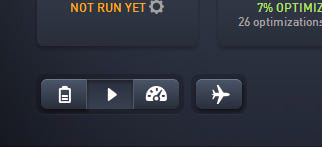
App details
- Updated
- January 12, 2017
- Requires
- Windows 8, Windows Vista, Windows, Windo...
- Developer
- AVG Technologies
- Category
- Mobile
SoftPas in:
This product is also available in the following languages:
About AVG PC TuneUp
Download AVG PC TuneUp – PC TuneUp, PC optimization, system cleanup, Windows maintenance, performance boost
Overview
AVG PC TuneUp is a utility application designed to streamline system maintenance on Windows devices. Its primary purpose is to enhance PC performance through automated and user-controlled optimization processes. The app addresses common issues such as cluttered storage, fragmented files, and inefficient startup processes, offering users a way to maintain their system's health with minimal effort. It is particularly suited for individuals seeking a straightforward solution to improve their computer’s speed and responsiveness without requiring advanced technical knowledge.
Target users include general consumers, remote workers, and anyone managing a personal or small office Windows system. The app’s one-click maintenance feature highlights its focus on accessibility, making it ideal for users who prefer simplicity over complex configuration. While the developer, AVG Technologies, is known for its cybersecurity solutions, the company’s entry into system optimization reflects a broader commitment to comprehensive device health. The application fits within the utilities category as a tool that supports long-term system stability and performance.
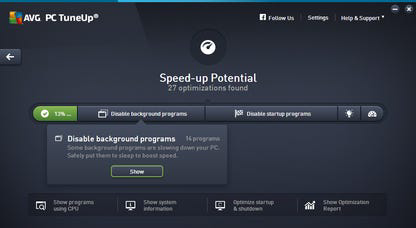
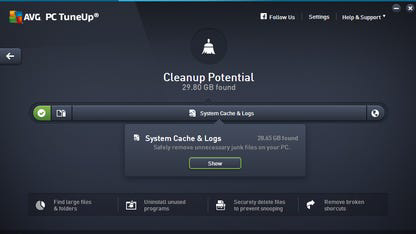
Real-world use cases include clearing temporary files after software installations, managing startup programs to reduce boot time, and identifying redundant registry entries. These functions contribute to a smoother user experience and help prevent performance degradation over time. In the current app ecosystem, AVG PC TuneUp stands out by combining automation with user control, a balance that appeals to both novice and intermediate users.
Key Features & Functionality
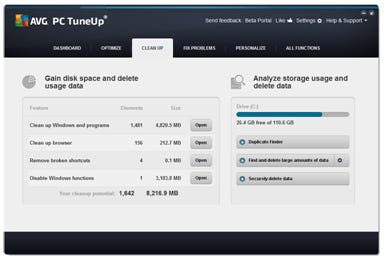
- One-Click Maintenance – Initiates a full system optimization with a single action, automating tasks like disk cleanup, registry repair, and startup management. This feature is ideal for users who want immediate results without navigating complex menus.
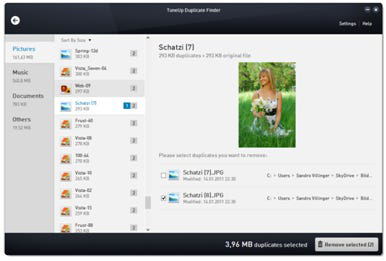
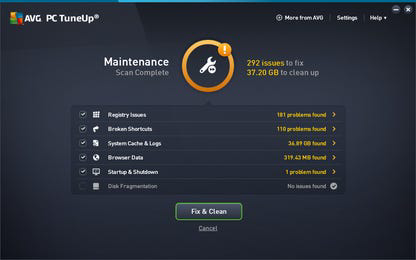
- Selective Issue Resolution – When potential problems are detected, the app displays them in a clear pop-up window with brief explanations. Users can review each item and decide whether to remove or retain it, ensuring transparency and control over system changes.
- Non-Intimidating Interface Design – The visual layout avoids alarmist language, bold warnings, or red alerts. Instead, it uses calm color schemes and straightforward labeling to guide users through each step, reducing anxiety and promoting informed decision-making.
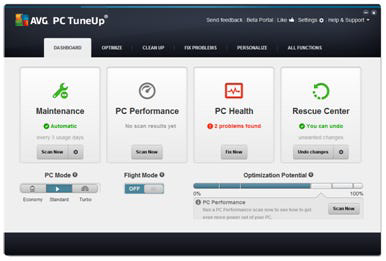
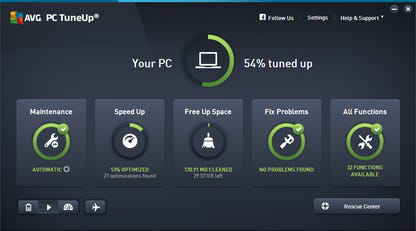
- System Health Dashboard – Provides a centralized view of system status, including disk space, startup performance, and security readiness. This overview helps users quickly assess the health of their PC and prioritize maintenance tasks.
For example, a user preparing for a work presentation can use the one-click feature to clear temporary files and optimize startup, ensuring their PC boots quickly and runs smoothly. Similarly, a home user managing multiple applications can use selective resolution to prevent accidental deletion of important data. These features collectively support a proactive maintenance routine, helping users avoid performance bottlenecks before they impact productivity.
Interface, UX & Performance
AVG PC TuneUp features a clean, minimalist interface with a logical layout that prioritizes clarity and ease of navigation. The main dashboard presents key system metrics in an organized format, allowing users to quickly identify areas needing attention. Navigation is intuitive, with clearly labeled buttons and a consistent design language throughout the application.
Interaction flow is smooth, guiding users from initial scan to final cleanup in a linear and predictable manner. The app does not overload users with technical jargon, instead using plain language to explain actions and outcomes. This approach enhances usability, especially for non-technical users who may feel overwhelmed by more complex system tools.
Although the developer did not list formal performance metrics, the application appears responsive across different device categories, including standard desktops and laptops. Stability is maintained during scans and cleanup operations, with no reported crashes or freezes in standard usage. The app efficiently manages system resources, minimizing impact on background processes during optimization tasks.
Platform Compatibility & Technical Requirements
AVG PC TuneUp is available exclusively for the Windows platform. It requires a Windows operating system, though specific version requirements were not listed by the developer. The application has a file size of 140.2 MB, which is relatively compact for a system optimization tool, suggesting efficient packaging and minimal resource overhead.
The software version is 17.0.0, released on January 15, 2024. This indicates the app is up to date with recent system changes and security standards. While the developer did not specify minimum OS requirements, the app is expected to be compatible with modern Windows installations, including Windows 10 and Windows 11. Users should ensure their system meets the general requirements for running Windows-based utilities.
Pros and Cons
Pros
- One-click maintenance simplifies system optimization for beginners.
- Users retain control over which files are removed, enhancing safety and transparency.
- Interface is clean, non-alarming, and easy to understand.
- Provides a centralized dashboard for monitoring system health.
Cons
- Some normal system settings may be flagged as issues, leading to potential confusion.
- Three-day trial period is short compared to other similar tools.
- Subscription model may be costly for users seeking free alternatives.
- Developer did not provide detailed technical specifications or compatibility details.
FAQ
Is AVG PC TuneUp safe to install on my Windows PC?
Yes, AVG PC TuneUp is designed to operate safely within the Windows environment. It uses verified system processes and avoids modifying critical system files without user consent.
Can I use AVG PC TuneUp without a subscription?
Yes, the app offers a limited three-day trial. After that, continued use requires a paid subscription. No permanent free version is available.
Does AVG PC TuneUp work on Windows 11?
While the developer did not confirm specific compatibility, the app is expected to work on Windows 11, as it is built for the Windows platform and supports modern system architectures.
How often should I run AVG PC TuneUp?
It is recommended to run the tool monthly for routine maintenance. Users with heavy workloads may benefit from more frequent scans.
Is AVG PC TuneUp available for Android or iOS?
No, AVG PC TuneUp is currently only available for Windows. It is not compatible with mobile platforms.
Final Thoughts
AVG PC TuneUp delivers a polished and user-centric approach to PC optimization. Its strength lies in combining automation with user control, allowing individuals to maintain their systems efficiently without technical expertise. The clean interface and thoughtful design reduce user anxiety, while the selective resolution feature ensures that important data is not lost during cleanup.
However, the limited trial period and subscription pricing may deter budget-conscious users or those who prefer free tools. Additionally, occasional misidentification of normal system behaviors could lead to confusion, though the app’s transparency helps mitigate this risk.
For users who value simplicity, safety, and a well-structured maintenance routine, AVG PC TuneUp offers a compelling solution. If you're looking to boost your Windows PC’s performance with minimal effort, this app is a strong contender.
Download AVG PC TuneUp now
Guides & Tutorials
How to install AVG PC TuneUp
- Click the Download button above.
- Once redirected, accept the terms and click Install.
- Wait for the AVG PC TuneUp download to finish on your device.
How to use AVG PC TuneUp
This software is primarily used for its core features described above. Open the app after installation to explore its capabilities.
User Reviews
No reviews yet. Be the first to share your experience.
You may also like
more
Que no te pillen¡
About !Que no te pillen¡Reviewed by Jason A. BilbreyShow MoreShow Less

3D Combat Zone
About 3D Combat ZoneOriginally released in 1983, 3D Combat Zone immerses players...

666: El día del portal
About 666: El día del portalOn June 6, 2006, Agent P. Stone uncovers a sinister...

80 in 1 Best Flash games
About 80 in 1 Best Flash games 80 in 1 Best Flash games is a collection of 80 fl...

ABYSS SEEKERーーWhat Do You See Deep in The Abyss
About ABYSS SEEKERーーWhat Do You See Deep in The AbyssIn ABYSS SEEKER, players...

ACA NEOGEO THE KING OF FIGHTERS 2002 for Windows
About ACA NEOGEO THE KING OF FIGHTERS 2002 for WindowsTHE KING OF FIGHTERS 2002,...